So this is a quick note to clear up some confusion I had regarding the airflow on Juniper EX4550 switches.
The airflow on these switches is either front-to-back or back-to-front however this is not immediately apparent from the datasheet, and this is always my quick go-to place for information. I think this is mainly my fault for not reading this properly but it is also written in a confusing way.
The datasheet states:
"port side to PSU side airflow" which if you are reading this quickly looks suspiciously like "side-to-side"
To be sure I've had this checked with Juniper, and it is verified in the tech doc below, but the airflow is definitely front-to-back, back-to-front PSUs are also available.
References
EX4550 PSU Tech Doc:
EX4550 Datasheet:
Showing posts with label Switching. Show all posts
Showing posts with label Switching. Show all posts
Friday, 28 March 2014

Tuesday, 15 October 2013
Webinar: Cisco Wired and Wireless Convergence and Mobility Architecture
Here's a WebEx meeting I found tucked away and thought I'd put it up.
recording links are below, CCO login required:
WebEx recording: http://tools.cisco.com/pecx/login?URL=searchCourse%3FcourseId%3D00052036
PDF: http://tools.cisco.com/pecx/login?URL=searchCourse%3FcourseId%3D00052035
MP4: http://tools.cisco.com/pecx/login?URL=searchCourse%3FcourseId%3D00052037
recording links are below, CCO login required:
WebEx recording: http://tools.cisco.com/pecx/login?URL=searchCourse%3FcourseId%3D00052036
PDF: http://tools.cisco.com/pecx/login?URL=searchCourse%3FcourseId%3D00052035
MP4: http://tools.cisco.com/pecx/login?URL=searchCourse%3FcourseId%3D00052037
Webinar: Nexus 7700
Notes from this Webinar
The Fab2 and CB Fab2 are different modules. the Fab2 modules are not interchangeable between the N7k or the N7700. (The CB stand for Crossbow). This is to do with the architecture.
2200 FEX can be used with the N7700:
2248PQ
2232TM-E
NX-OS 6.2 introduces the ability to configure M1, M1-XL, M2, F2e modules in the same VDC
Fabric Path Anycast - multiple active L3 default gateways. L3 ECMP load balancing
Here are the Links to the recording, CCO Login required:
WebEx recording: http://tools.cisco.com/pecx/login?URL=searchCourse%3FcourseId%3D00054194
PDF: http://tools.cisco.com/pecx/login?URL=searchCourse%3FcourseId%3D00054193
MP4: http://tools.cisco.com/pecx/login?URL=searchCourse%3FcourseId%3D00054382
The Fab2 and CB Fab2 are different modules. the Fab2 modules are not interchangeable between the N7k or the N7700. (The CB stand for Crossbow). This is to do with the architecture.
2200 FEX can be used with the N7700:
2248PQ
2232TM-E
NX-OS 6.2 introduces the ability to configure M1, M1-XL, M2, F2e modules in the same VDC
Fabric Path Anycast - multiple active L3 default gateways. L3 ECMP load balancing
Here are the Links to the recording, CCO Login required:
WebEx recording: http://tools.cisco.com/pecx/login?URL=searchCourse%3FcourseId%3D00054194
PDF: http://tools.cisco.com/pecx/login?URL=searchCourse%3FcourseId%3D00054193
MP4: http://tools.cisco.com/pecx/login?URL=searchCourse%3FcourseId%3D00054382
Cisco 3850 Directly Connected APs Only
The 3850 switches are part of the converged access solution by using the embedded controller to terminate CAPWAP tunnels on the switch itself. One note which perhaps is obvious to someone else but wasn't to me is that the AP must be directly connected to the 3850 switch, you cannot have another switch in the way.
I queried this with Cisco and they said it was a software decision not a hardware limitation, so maybe it could change but at this point in time that doesn't look likely.
While I'm on the subject of 3850s, a new release of code is out which brings the features more in line with the 3750X. Still not exactly there but better:
References:
Cisco Unified Access Technology Overview: Converged Access Whitepaper
Thursday, 18 July 2013
Cisco StackPower Budgets and Info
So Cisco StackPower is a way of distributing power across a stack of C3750X and C3850 switches. The idea is that instead of each switch having multiple redundant PSUs you just need a couple and should a single PSU fail in the stack, if the switch wouldn't have enough power to maintain full operation it can draw unused power from other switches in the stack which have excess power.
Pretty cool but one thing to be aware of is each switches power budget. So although the datasheet for each switch states the power consumption of a switch this is not the amount a switch requires for operation and this is the power budget. For example C3750X-24 switches state that the power consumption at 100% load is 93.5W. You would then assume that a 350W power supply would be able to power 3 of these switches. This is not the case. A C3750X-24 switch actually has a power budget requirement of 190W, meaning you cannot power 2 switches with a single 350W power supply.
Stack power switch power budgets and further information can be found at the below reference:
References and Resources:
Cisco Stack Power White Paper
http://www.cisco.com/en/US/prod/collateral/switches/ps5718/ps6406/white_paper_c11-578931.html
Pretty cool but one thing to be aware of is each switches power budget. So although the datasheet for each switch states the power consumption of a switch this is not the amount a switch requires for operation and this is the power budget. For example C3750X-24 switches state that the power consumption at 100% load is 93.5W. You would then assume that a 350W power supply would be able to power 3 of these switches. This is not the case. A C3750X-24 switch actually has a power budget requirement of 190W, meaning you cannot power 2 switches with a single 350W power supply.
Stack power switch power budgets and further information can be found at the below reference:
References and Resources:
Cisco Stack Power White Paper
http://www.cisco.com/en/US/prod/collateral/switches/ps5718/ps6406/white_paper_c11-578931.html
Thursday, 11 July 2013
Cisco FabricPath - As I Understand It
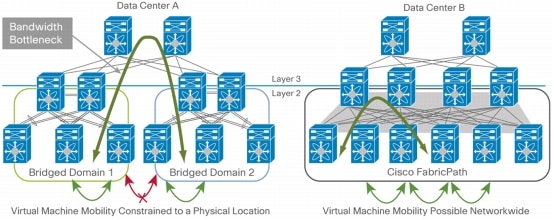
Data centers are different to many enterprise campuses in that they need to extend layer 2 connectivity across large portions of the data center, often to take advantage technologies such as moving virtual machines around the data center.
Without going too far under the hood and staying very conceptual at this stage FabricPath uses a control protocol on top of IS-IS to delivery scalable L2 connectivity without blocking links.
Instead of the classic "data center triangle" using vPC and 2 connections to each pods aggregation switch FabricPath has a single connection to each aggregation switch. Using the example above the bandwidth is the same (40Gbps) but aggregation switch failure only reduces this by 25% rather than 50%.
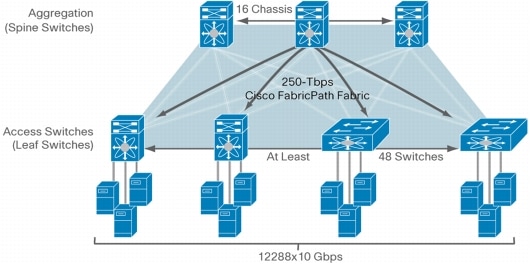
FabricPath uses ECMP (Equal Cost MultiPath) so that all links are forwarding and the ports in a port channel is 16 and ECMP v1 supports 16 way ECMP, making the fabrics potential 2.56Tbps (16 ports x 16 way x 10Gbps = 2560Gbps) as illustrated in the next diagram, again taken from the Cisco FabricPath white paper:
Some benefits of FabricPath include:
- Simpler configuration
- Scalable layer 2 connectivity
- Higher Bandwidth
- Better availability in failure scenarios
Resources:
This information was mainly taken from the Cisco FabricPath whitepaper but trimmed and reworded for my own reference:
Cisco FabricPath Whitepaper
Monday, 20 May 2013
Cisco Nexus B22 Fabric Extender
If you are searching for the B22 fabric extended but cannot find a price from Cisco, the reason is because you cannot buy this product from Cisco. It is something that HP OEMs so you will have to go to HP instead.
Datasheet:
http://www.cisco.com/en/US/prod/collateral/switches/ps9441/ps10110/ps11975/data_sheet_c78-685265.html
Datasheet:
http://www.cisco.com/en/US/prod/collateral/switches/ps9441/ps10110/ps11975/data_sheet_c78-685265.html
Thursday, 4 April 2013
Cisco C3750X vs C3750E Switches
Cisco has, fairly recently, made end of life a number of older 3750 switches end of life. The way forward with the 3X50 series are the C3750X and the C3850 switches and this depends on your exact features required as well as if you want to do unified access (CAPWAP termination on controllers built into access layer switches - and that's another story!). But the reason for my post is to document some of differences between the C3750E (end of life) and C3750X (the recommended replacement). This post focuses on how the C3750E and C3750X are different and similar.
The C3750X is very similar to the C3750E except it is more feature rich. They are both built on the same ASICs and switch fabric and both employ stackwise plus, so you can have stacks consisting of E and X switches. There are, however, a number of features available in the C3750X switches not available in the C3750E:
The C3750X is very similar to the C3750E except it is more feature rich. They are both built on the same ASICs and switch fabric and both employ stackwise plus, so you can have stacks consisting of E and X switches. There are, however, a number of features available in the C3750X switches not available in the C3750E:
- Four optional uplink network modules with GE or 10GE ports
- PoE+ with 30W power on all ports in 1 rack unit (RU) form factor
- Dual redundant, modular power supplies and fans
- Cisco StackPower technology
- Media Access Control Security (MACsec) hardware-based encryption
- Flexible NetFlow and switch-to-switch hardware encryption with the Service Module
- USB Type-A and Type-B ports for storage and console
- Three software feature sets: LAN Base, IP Base, and IP Services(LAN Base is not available on the 3750E series)
There aren't any features on the E which isn't on the X, the only items which are worth considering are the 10Gigabit Ethernet modules - The C3750E has them built in where as the C3750X requires an additional module, the 10Gigabit interfaces are also different, X2 and SFP+. Lastly the backup is different - The C3750E uses RPS2300 where as the C3750X uses the XPS2200.
As a bonus, as long as the IOS is the same and a 10Gigabit module is installed the configurations should be compatible, I've not tested it but the theory is most definately there.
As a bonus, as long as the IOS is the same and a 10Gigabit module is installed the configurations should be compatible, I've not tested it but the theory is most definately there.
Wednesday, 3 April 2013
Cat6500 with SUP720-3B NAT performance figures
Here's a little query I had about performance figures for a Cat6500 with the SUP720-3B. The answers and some transcript is below:
Regarding static NAT on the Catalyst 6500 with Sup 720, we do not recommend configuring large numbers of static NAT entries on Supervisor 720 (100-200 entries is a safe ballpark figure, and should be adequate for most deployments).
Regarding static NAT on the Catalyst 6500 with Sup 720, we do not recommend configuring large numbers of static NAT entries on Supervisor 720 (100-200 entries is a safe ballpark figure, and should be adequate for most deployments).
Since NAT uses the NetFlow TCAM to store its entries, the
total number of NAT entries depends on the forwarding engine being used :
Non-XL – 512K (Ingress / Egress)
XL – 512K Ingress, 512K Egress
The non-XL TCAM is shared for both directions, while the
XL TCAMs are unique to each direction.
Tuesday, 2 April 2013
Cisco 3850 as a Wireless LAN Controller
Using 3850's as WLC is a relatively easy feat you just need the 3850 switch with IP Base or IP Services and finally a number of AP licenses equal to the number of access points. Remember that a single switch can have up to 50 access points, and a switch stack can have up to 50 APs as well.
Example part numbers might be:
WS-C3850-24T-S
LIC-CTIOS-1A
One thing that threw me initially on the data sheet is the below part number:
L-LIC-CT3850-UPG
It bills it as an upgrade license so I assumed it was required to upgrade the switch enabling the WLC. This is not the case. This part is a top level part used to add additional licenses to an existing 3850 switch.
Nexus 7004 Architecture
The Cisco Nexus7004 is a 4 slot chassis, which comprises of 2 supervisor slots and 2 line card slots, 2 power supplies and 5 fabric channels.
The fabric channels are a little unique to the 7004 because although they are similar to the fabric2 modules, operating at up to 110Gbps each they are hardwired into the switch so they are not removable or upgradable. To allow for central arbitration and a management connection between the modules and supervisors one of the fabric modules is reserved for this, making the potential system fabric speed 440Gbps.
The above figure is dependant on the modules used in the chassis. Because there is only 2 slots the bandwidth between the two cards will be dependant on the slowest line, up to the potential 440Gbps.
Below is a picture showing the architecture.

The fabric channels are a little unique to the 7004 because although they are similar to the fabric2 modules, operating at up to 110Gbps each they are hardwired into the switch so they are not removable or upgradable. To allow for central arbitration and a management connection between the modules and supervisors one of the fabric modules is reserved for this, making the potential system fabric speed 440Gbps.
The above figure is dependant on the modules used in the chassis. Because there is only 2 slots the bandwidth between the two cards will be dependant on the slowest line, up to the potential 440Gbps.
Below is a picture showing the architecture.
FET-10G= Hidden SKU
You might come across the same issue I did when trying to order FET-10G as spare parts. Ordinarily these items come as part of a larger build, Nexus for example, however what do you do if you want to order some on their own say as spares?
We it turns out the correct part code is:
FET-10G=
And although it's not on the pricing tool, price list, or the DCT, it is orderable. it comes up on the CCW and the ordering tool (so I'm told, I've not tried the ordering tool myself).
We it turns out the correct part code is:
FET-10G=
And although it's not on the pricing tool, price list, or the DCT, it is orderable. it comes up on the CCW and the ordering tool (so I'm told, I've not tried the ordering tool myself).
Thursday, 28 March 2013
6500 X6700, X6800, X6900 line card inter-operation
When deploying line cards and supervisors into a 6500 series chassis there are a number of things to consider. One of which is the line cards you will use and how they will actually operate.

This post specifically talks about the Sup2T because the older SUP720s are pretty much end of life, and if you are still getting hold of them for whatever legacy / governance reasons you probably know all about them anyway so from here on out all references in this post will be assuming we are using a Sup2T.
When deploying a 6500 chassis with a Sup2T you have the choice of the following line cards: X6700, X6800, X6900 and select X6100. There is only one X6700 which isn't compatible, the WS-X6708-10G.
Older DFCs are not compatible, the DFC, DFC2 or DFC3x, this is because DFCs use the same architecture as the PFC on the supervisor and the Sup2T uses a different PFC architecture to older Sups. The Sup2T uses a PFC 4 and as such only DFC4s can operate with it. X6700 cards with DFC3x will have to be upgraded to DFC4s and will function in dCEF720 mode.
X6100 line cards will function in "classic mode"
X6700 line cards which are equipped with CFC will function in CEF720 mode.
X6700/X6800 line cards equipped with DFC4 will function in dCEF720 mode
X6900 line cards which are equipped with DFC4 will function in dCEF2T mode.
X6700 line cards which are upgraded with DFC4 will be functionally equivalent to X6800 line cards but still shown as X6700 as an identity.
CEF720 mode has 1 or 2 x 20Gbps connections to the switch fabric for data forwarding and a connection to the 32Gbps shared bus for control traffic.
dCEF720 mode doesn't connect to the shared bus just the 2 x 20Gbps switch fabric channels. dCEF720 mode has a top throughput of 40Gbps because of the fabric channels, make a note of this when calculating over subscription ratios.
dCEF2T mode supports 2 x 40Gbps channels to the switch fabric
Sup2T switch crossbar fabric:
The Sup2T has 26 fabric channels which each run at 40Gbps, or 20Gbps to provide backwards compatibility with X65700 and X6800 line cards. Each line card slot has 2 dedicated fabric channels so even a 6513 chassis has the full bandwidth available to each port. N.B In a 6513-E chassis slots 7 and 8 are sup only slots because they get only one channel each. The reason for this is because 2 channels are used to connect to the fabric ASIC and Bridge ASIC leaving only 24 channels for slots, but as it is designed in this way the line cards are never affected and always get the full 2 channels each.
This image was taken from the Cisco Sup2T architecture white paper linked below.
The Sup2T architecture White paper is a fantastic resource well worth anyone reading:
http://www.cisco.com/en/US/prod/collateral/switches/ps5718/ps708/white_paper_c11-676346.html
The other arctiture document worth reading is older and touches on the Sup720, still interesting:
http://www.cisco.com/en/US/prod/collateral/switches/ps5718/ps708/prod_white_paper0900aecd80673385.html
VS-6509 Common Criteria Certification for EAL3
So this was a question I had to punt to the partner helpline and below is the response I got:
Below is what I have found, but I believe this is the document where you found the certificate for 12.2(18)SXF11.
Industry Solutions - Common Criteria
http://www.cisco.com/web/strategy/government/security_certification/net_business_benefit_seccert_common_criteria.html
Below is some information I found from our internal resources regarding Common Criteria:
There is no targeting for new Common Criteria update for Sup720 at this
time. We will have to rely on 12.2(33)SXF with the Sup720-3B. For a new round of Common Criteria, we are targeting the Sup2T by June 2012. The EAL4 designation is no longer being certified in the US and several other Common Criteria certifying countries like UK, Australia, etc. so we will have to go with what is offered in the US which is a EAL1/EAL2 based Network Device Protection Profile Common Criteria
Certification. So going forward, the EAL4/3/2/1 designations won't mean anything with relation to Common Criteria.
You can refer to the link below for more information.
Security Requirements for Network Devices
http://www.commoncriteriaportal.org/files/ppfiles/pp_nd_v1.0.pdf
Hopefully this wont be too relevant any more because the Sup-720 is end of life and the SUP2T is the way forward but it's good to keep a not of it!
Below is what I have found, but I believe this is the document where you found the certificate for 12.2(18)SXF11.
Industry Solutions - Common Criteria
http://www.cisco.com/web/strategy/government/security_certification/net_business_benefit_seccert_common_criteria.html
Below is some information I found from our internal resources regarding Common Criteria:
There is no targeting for new Common Criteria update for Sup720 at this
time. We will have to rely on 12.2(33)SXF with the Sup720-3B. For a new round of Common Criteria, we are targeting the Sup2T by June 2012. The EAL4 designation is no longer being certified in the US and several other Common Criteria certifying countries like UK, Australia, etc. so we will have to go with what is offered in the US which is a EAL1/EAL2 based Network Device Protection Profile Common Criteria
Certification. So going forward, the EAL4/3/2/1 designations won't mean anything with relation to Common Criteria.
You can refer to the link below for more information.
Security Requirements for Network Devices
http://www.commoncriteriaportal.org/files/ppfiles/pp_nd_v1.0.pdf
Hopefully this wont be too relevant any more because the Sup-720 is end of life and the SUP2T is the way forward but it's good to keep a not of it!
ASA Services module Code version 8.4 and below
Version 8.4 and before isn't available on the ASA services module, only version 8.5 onwards. So if you want to deploy version 8.4 or below then you will need a physical ASA appliance.
Release Notes for the Cisco Catalyst 6500 Series ASA Services Module, 8.5(x)
http://www.cisco.com/en/US/docs/security/asa/asa84/release/notes/asarn85.html
Release Notes for the Cisco Catalyst 6500 Series ASA Services Module, 8.5(x)
http://www.cisco.com/en/US/docs/security/asa/asa84/release/notes/asarn85.html
CD-3560-EMI= Electronic Delivery
CD-3560-EMI= Electronic version
There is no electronic delivery option for the 3560 upgrade to IP Services. This is presumably because the 3560 is end of life now so there is no point creating a new electronic delivery part, so I understand the reasoning. It just means you can't upgrade a 3560 IOS in a hurry, not officially anyway.
Cisco Catalyst 3560 Series Switches Data Sheet
http://www.cisco.com/en/US/partner/prod/collateral/switches/ps5718/ps5528/product_data_sheet09186a00801f3d7d.html
VSS on the 7600
Q1/ Can you please tell me if the 7600 chassis supports VSS? If I was to get 2 x VS-SUP720-10G supervisors could I configure the 7600 with VSS?
A1/ Yes the 7600 chasis support VSS using VS-SUP720-10G supervisor, please refer to the following link below on table 1:
http://www.cisco.com/en/US/prod/collateral/switches/ps5718/ps708/product_data_sheet09186a0080159856_ps2797_Products_Data_Sheet.html
LAN versions of only IOS
It seems that LAN only IOS tries to streamline the code by removing support for WAN interface modules (6500/7600 Flex WAN modules and Optical Services Modules (OSMS):
https://supportforums.cisco.com/message/136460#136460
Tuesday, 14 August 2012
Calculating Packets Per Second of Devices
So here's a topic which just keeps cropping up and I look it up every time, so I'm sticking it on the blog so that I've got a reference for the future and hopefully I'll remember it a bit better for next time!
You will often have to calculate the required packets per second of a device to make sure it is "powerful enough" to handle the job given to it. Alternatively you may be sizing a device for a link, for example a router for a WAN connection, and you want to make sure it can handle wire speed on the link. Here is my calculations for this.
I'll use the standard example of a 1 gigabit WAN connection 1Gbps, this is 1,000,000,000 bits:
 In order to work out the required pps (Packets Per Second) of a device for the WAN link we need to consider the maximum and minimum packet sizes. Bear in mind the packet size in reality will vary so the actual number is anyone's guess but this gives you a great boundary.
The minimum packet size is 84 bytes (46 payload, 4 CRC, 2 MAC type, 6 MAC source address, 6 MAC destination address, 8 preamble, 12 inter frame gap).
The maximum packet size is 1538 bytes (same as above but with 1500 payload instead of 46)
The calculation is:
Convert bits into bytes -- 1,000,000,000 bits per second / 8 = 125,000,000 bytes per second
Convert bytes into packets -- 125,000,000 bytes per second / 84 = 1,488,096 packets per second
The above works out the minimum packets per second, changing 84 to 1538 works out the maximum packets per second:
Convert bytes into packets -- 125,000,000 bytes per second / 1538 = 81,274 packets per second
From this we know if all the packets were the minimum sized we'd need a more powerful device to handle wirespeed, but this is theoretical because you wont be able to guarantee the size of all packets, apart from in very special cases.
If you can work out the average packet size within the environment you will be able to workout more accurately the device requirements, but from here is it a bit of a guessing game do you plan for the lowest possible packet size to ensure the device can handle wirespeed or do you pick a more realistic but unknown value somewhere in the middle. That answer is up to you.
You will often have to calculate the required packets per second of a device to make sure it is "powerful enough" to handle the job given to it. Alternatively you may be sizing a device for a link, for example a router for a WAN connection, and you want to make sure it can handle wire speed on the link. Here is my calculations for this.
I'll use the standard example of a 1 gigabit WAN connection 1Gbps, this is 1,000,000,000 bits:

The minimum packet size is 84 bytes (46 payload, 4 CRC, 2 MAC type, 6 MAC source address, 6 MAC destination address, 8 preamble, 12 inter frame gap).
The maximum packet size is 1538 bytes (same as above but with 1500 payload instead of 46)
The calculation is:
Convert bits into bytes -- 1,000,000,000 bits per second / 8 = 125,000,000 bytes per second
Convert bytes into packets -- 125,000,000 bytes per second / 84 = 1,488,096 packets per second
The above works out the minimum packets per second, changing 84 to 1538 works out the maximum packets per second:
Convert bytes into packets -- 125,000,000 bytes per second / 1538 = 81,274 packets per second
From this we know if all the packets were the minimum sized we'd need a more powerful device to handle wirespeed, but this is theoretical because you wont be able to guarantee the size of all packets, apart from in very special cases.
If you can work out the average packet size within the environment you will be able to workout more accurately the device requirements, but from here is it a bit of a guessing game do you plan for the lowest possible packet size to ensure the device can handle wirespeed or do you pick a more realistic but unknown value somewhere in the middle. That answer is up to you.
Subscribe to:
Posts (Atom)